


Data-Analysis-Agent
🚀你的私人数据分析助手。通过对话式交互,自动生成可视化报表与商业洞察,让数据决策变得像聊天一样简单。 🚀 Your personal data analysis assistant. Say goodbye to complex SQL and Excel formulas. An LLM-powered da
Sign in to rate this tool.
Overview
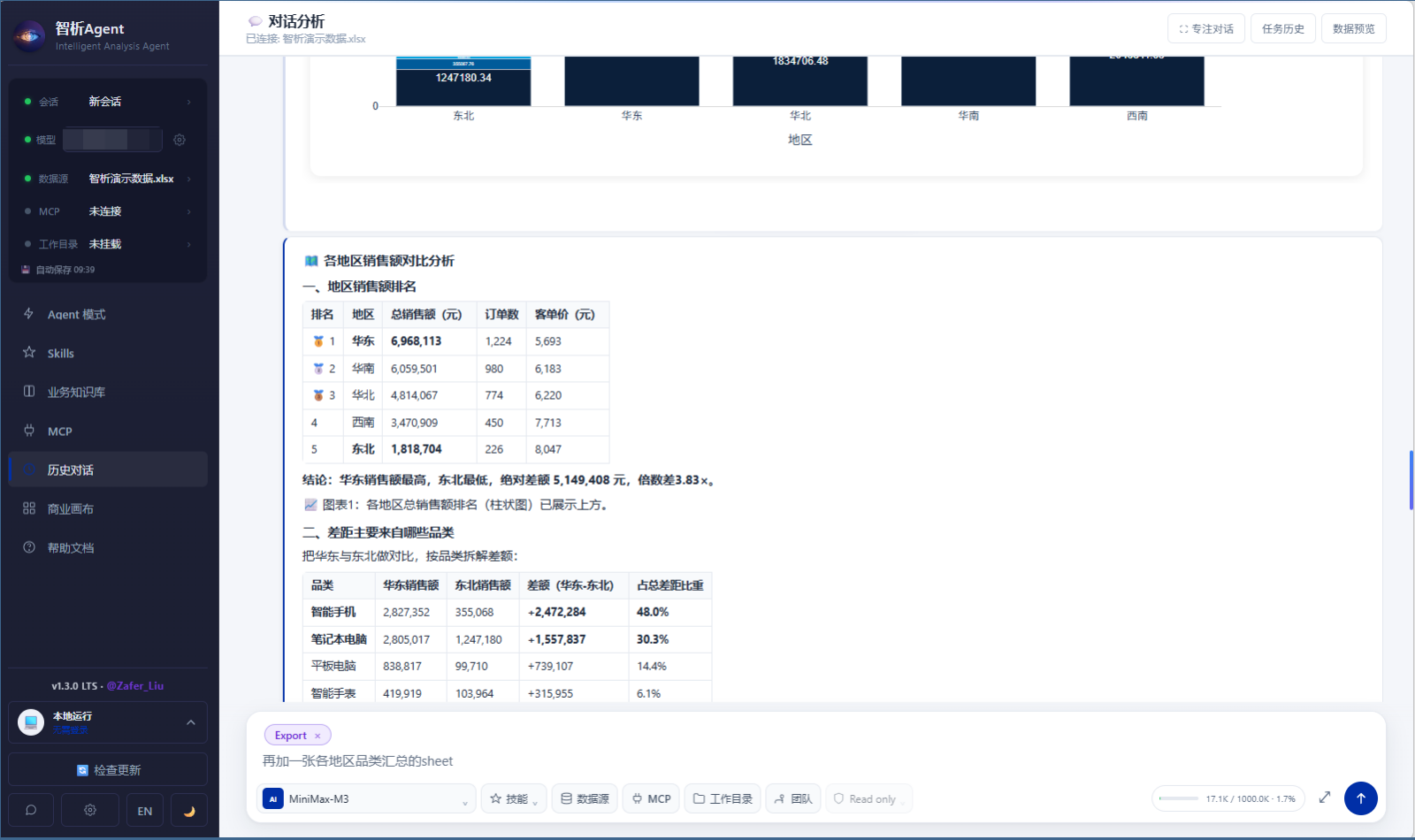
Data‑Analysis‑Agent is an open‑source, conversational data analysis assistant. You can use it online, download a desktop version, or run it locally from the command line. The tool accepts Excel, CSV, SQLite, MySQL, PostgreSQL, or SQL Server files and lets you ask questions in natural language.
When you upload or connect a data source, the Agent first previews the dataset, showing sheets, columns, and sample rows. This preview step helps reduce misunderstandings before the AI starts working. Next you pose a question in plain English, such as “What is the sales gap by region and product category?” The Agent automatically writes and executes the necessary SQL, then presents the result in a single conversation. If you want visual insight, you can request a chart. The system offers forty‑three smart chart types, including comparison, trend, distribution, geographic, relationship, and share visualisations, so you can quickly see patterns without leaving the chat.
The platform also supports advanced analytics. It can perform anomaly detection, percentile calculations, clustering, decision tree modeling, regression, and funnel analysis. For time‑series data, you can choose from ARIMA, SARIMA, Prophet, VAR, or GRU workflows. Every conclusion is paired with evidence: the SQL query, data quality checks, and metric definitions, allowing you to verify each step. If you need more than one analyst, the system lets you create multiple Agents, schedule tasks, and add manual approval nodes. The workflow engine assigns tasks based on dependencies and can pause or resume analyses automatically.
Reporting is integrated into the conversation. You can export the finished analysis as cleaned Excel, Word reports, or slide decks with built‑in styles. The Agent also provides a business canvas that includes template SWOT, BCG, and business model canvases; these can be edited in draw.io and exported. Hooks let you trigger actions, such as sending a message or exporting a file, at specific points in the dialogue. If you use Feishu, you can read and write multi‑dimensional tables directly in a group chat.
Key features
- Upload Excel, CSV, or connect to SQLite, MySQL, PostgreSQL, SQL Server
- Natural‑language query that auto‑generates and runs SQL
- 43 smart chart types covering comparison, trend, distribution, geography, relation, and share graphs
- Advanced statistical models: anomaly detection, clustering, decision trees, regression, funnel analysis
- Time‑series forecasting with ARIMA, SARIMA, Prophet, VAR, GRU
Details
- Pricing
- Free
- Last checked
- 18h ago
- Indexing
- noindex, follow
- Category
- Data
Suggest an edit
Sign in to suggest an edit.
Pros and cons
Pros
- Full analysis and reporting within a single conversation
- Transparent, evidence‑based conclusions with SQL source code
- Supports a wide range of data sources and advanced modelling options
- Works online, as a desktop app, or locally via command line
Cons
- No published pricing; free as open source but requires self‑hosting for private data
- Requires manual setup for desktop or terminal use
- Limited to the data formats and database drivers listed on the site
Alternatives
 Quills AIFor a straightforward look at an option like this, Quills AI is a sensible place to start. Visit quills.ai to see live examples and up-to-date details. The tool is free,...
 Quadratic MultiplayerBefore you decide, skip the speculation and look at the source. quadratichq.com shows exactly what Quadratic Multiplayer does today and how to get started with it. Plenty of detail is...
 Excel Formula BotFreelancers use it to keep client work moving, while in-house teams rely on it for consistent output across projects. Either way, the routine parts of ai chatbots work get faster....
 Chatcsv CoPower users get deeper controls, while casual users can ignore them. The result is a tool that scales from quick one-off tasks to larger recurring workloads. If ai chatbots tasks...
 AskyourdatabasePower users get deeper controls, while casual users can ignore them. The result is a tool that scales from quick one-off tasks to larger recurring workloads. Before you decide, skip...
 LakesailThe tool is free, which keeps the barrier to entry low. You can try it before deciding whether it earns a permanent place in your workflow. Built for ai marketing...
 KadoaIf ai coding tasks take up too much of your day, Kadoa is built to give you time back. It handles the heavy lifting while leaving you in control. A...
 Dhtmlx ChatbotThe tool is free, which keeps the barrier to entry low. You can try it before deciding whether it earns a permanent place in your workflow. For a straightforward look...
 GlideGlide (GlideOS) turns your existing spreadsheets into internal business apps and agents, with SheetSense reading formulas and data before it builds.
 LatitudeData workspace and prompt engineering platform for AI product teams.
 PdfgearThe whole experience is built around finishing things. From the first run onward, you are guided toward complete, usable results rather than half-finished experiments. Teams running regular ai coding campaigns...
 ChatGPTChatGPT review (October 2026): features, verified Free, Go, Plus and Pro pricing, who it suits, pros, cons and alternatives on AIMAPER.