


Sign in to rate this tool.
Overview
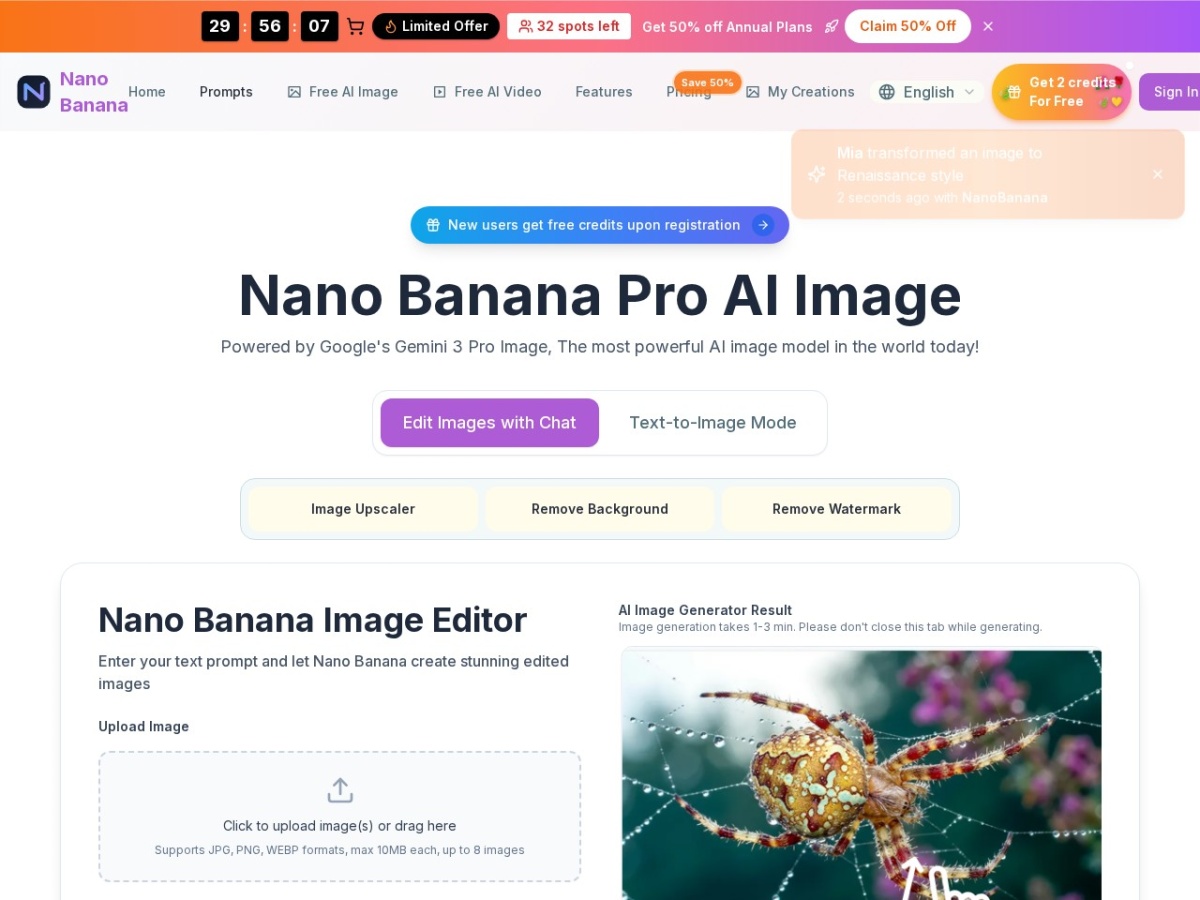
Nano Banana is a free AI image editor that lets you generate and edit photos using natural‑language prompts. You can sign up without a card and receive free credits when you create an account. Once you have credits, the interface allows you to upload images and instruct the model to perform transformations.
The editor follows a three‑step workflow. First, you upload image files; only JPG, PNG, and WEBP are accepted, each up to 10 MB. Users can upload up to eight images at a time, which the system treats as reference images for generating variations. Second, you type a prompt into the text box. Prompts can describe simple actions like “remove background” or more creative tasks such as “turn this portrait into a 1920s oil painting.” You can also switch the mode to “Text‑to‑Image” and let the tool generate new images from scratch. The prompt interface offers a “Browse prompts” option, and you can choose styles from a list of presets. When you hit generate, Nano Banana selects one of its model options, Nano Banana Z‑Image Turbo, Seedream 5 Flash, or Qwen Image, based on the selected parameters. The system also lets you specify an output count (1, 2, 4, 6, or 10) and an aspect ratio (9:16, 16:9, 1:1, 3:4, 4:3, 3:2, 2:3, 5:4, 4:5, or 21:9). Once the request is submitted, the tool uses Google's Gemini 3 Pro Image backend to produce results in about three seconds. The output images are delivered at up to 2K resolution, and they can be downloaded directly without further post–processing.
Who can use Nano Banana? The editor is aimed at individuals and small content creators who need quick edits, such as removing a background, adding a specific lighting effect, or changing a style while keeping the original composition. The service is useful for generating stock‑style images too, as the prompt prompts include options for photorealistic, anime, or oil painting results. Designers who prefer a no‑code, text‑based workflow will find the interface straightforward. The editor may not be ideal for those who require complex multi‑layered edits, detailed manual touch‑up, or batch processing beyond the eight‑image limit.
Details
- Pricing
- Freemium
- Last checked
- not yet
- Indexing
- index, follow
- Category
- Image
Suggest an edit
Sign in to suggest an edit.
Pros and cons
Pros
- No credit card required to start
- Supports common image formats up to 10 MB
- Generates high‑resolution 2K images quickly
- Offers preset styles and prompt browsing
- Batch upload capability up to eight images
Cons
- Limited free credits; paid plans not explicitly priced here
- No API or external integration details provided
- No mention of multi‑layer or advanced manual editing tools
- Availability depends on Google Gemini 3 Pro Image licensing
Alternatives
 AI Photo EditorIf ai image generation tasks take up too much of your day, AI Photo Editor is built to give you time back. It handles the heavy lifting while leaving you...
 Fluxai Art Free AI Image GeneratorRather than chasing every possible feature, Fluxai Art Free AI Image Generator picks the ones that matter and does them well. That restraint is noticeable the first time you open...
 AI Christmas Photo GeneratorFor a straightforward look at an option like this, AI Christmas Photo Generator is a sensible place to start. Visit genimg.ai to see live examples and up-to-date details. Freelancers use...
 CraiyonCraiyon makes AI images from plain-language prompts with no account needed, and adds paid editing credits, private images and no watermarks.
 NightCafeNightCafe is a community-focused AI art generator with 50+ PRO image models, video tools, daily challenges and four PRO credit plans.
 AI Ease AI Photo EditorSmall operations appreciate the low setup cost, and larger teams value the consistency. Both end up spending less time on busywork and more on the actual result. It also plays...
 FotorFotor is an online photo editor and design tool with dozens of one-click AI tools for enhancing, removing, styling, generating images and video.
 Bulk Image GenerationPlenty of detail is tucked into the options area: adjustable quality levels, formatting choices, and automation that removes the repetitive part of ai image generation work. Freelancers use it to...
 Image to Claymation AI GeneratorImage to Claymation AI Generator appears...
 Image to ImageImage to Image is a web app that combines an uploaded photo with a text prompt to create a new version of that image, keeping useful visual context such as…
 OksuroYou will find a free plan, making it easy to test the tool against your own needs first. The practical way to judge it is to use it. What stands...
 AI Profile Picture MakerThe feature set covers the basics well and adds thoughtful extras - keyboard shortcuts, reusable templates, and clean sharing options - without overwhelming you. Built for ai image generation work,...