


Huehive
The tool is free, which keeps the barrier to entry low. You can try it before deciding whether it earns a permanent place in your workflow. Built for ai analytics...
Sign in to rate this tool.
Overview
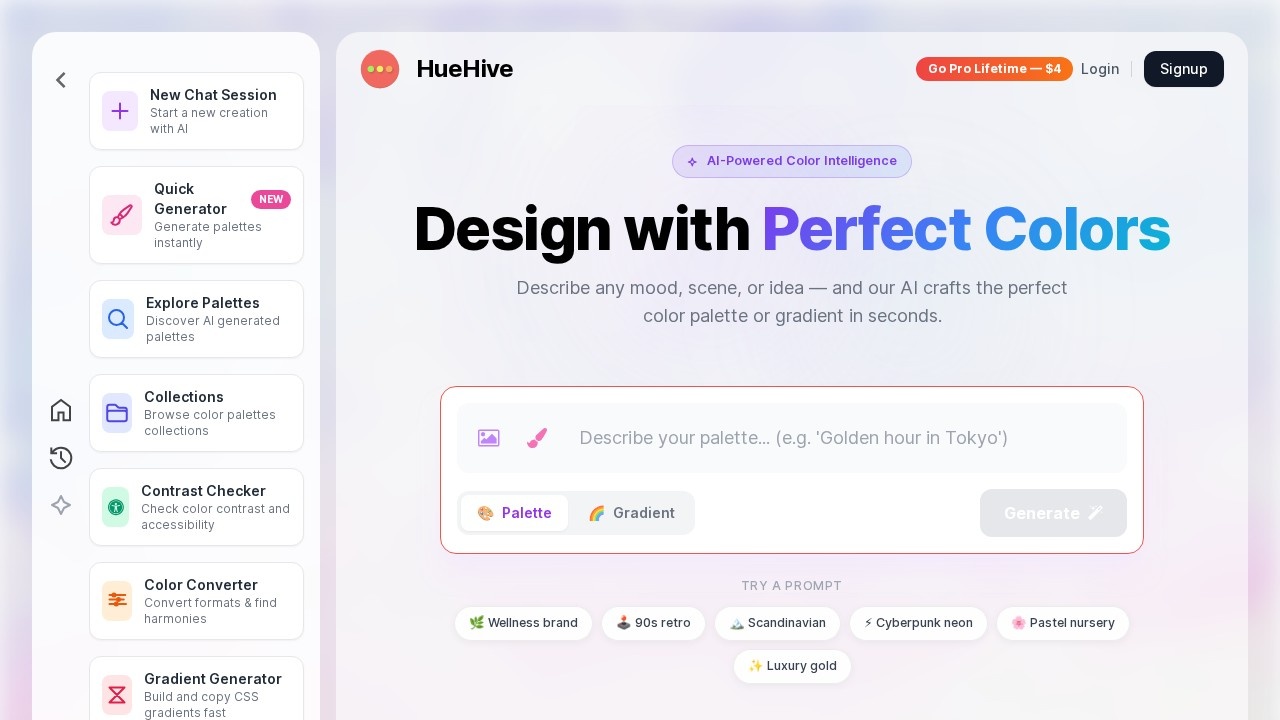
HueHive is an AI color palette generator. You describe a mood, scene or idea in words, and its AI creates a color palette or gradient in seconds. It is aimed at designers, developers and anyone choosing colors for a brand, website or project.
AI palettes from prompts
You can type a description such as "cozy coffee shop" or "futuristic tech". Prompt suggestions on the site include a wellness brand, 90s retro, Scandinavian, cyberpunk neon, pastel nursery and luxury gold. You choose whether to generate a palette or a gradient, and work happens in chat sessions so you can refine the result.
Palettes from photos
You can upload, paste or drag an image to extract a palette from it, which helps you match colors to a product photo, a mood board or a location.
Other tools
The Quick Generator creates palettes in one click with no prompt, for instant inspiration. The Contrast Checker verifies WCAG AA and AAA accessibility compliance, so text and background combinations stay readable. The Color Converter switches between HEX, RGB, HSL and CMYK and finds harmonies and complementary shades. The Gradient Generator builds linear, radial and conic CSS gradients and lets you copy production-ready code.
Inspiration
You can explore palettes and browse collections made on the site. HueHive says more than 25,000 palettes have been created.
Pricing
There is a free-forever plan. The site offers a Pro upgrade advertised as a $4 lifetime purchase; check what Pro includes before buying.
Who it suits
It suits web designers, developers, brand designers and hobbyists who want quick color ideas plus practical tools for accessibility and code.
Things to consider
AI-generated palettes are a starting point; test them in real layouts and check contrast for every text and background pair you use. CMYK conversions are approximate, so check print colors with a proof or your printer's profile. For brand work, record final values in a style guide.
A useful tip on the site is that you can paste an image directly into the generator. The image extractor picks out the dominant colors in a photo. A guided tour introduces new users to the AI features, and the palettes you create can be saved in sessions and revisited later. This mix of generation and checking tools means you can go from an idea to accessible, copyable color values in one place.
Details
- Pricing
- Freemium
- Release date
- 2026-03-01
- Last checked
- 4d ago
- Indexing
- index, follow
- Category
- Design
Suggest an edit
Sign in to suggest an edit.
Alternatives
 Depix AIThe tool is free, which keeps the barrier to entry low. You can try it before deciding whether it earns a permanent place in your workflow. What stands out most...
 The New BlackBefore you decide, skip the speculation and look at the source. thenewblack.ai shows exactly what The New Black does today and how to get started with it. Plenty of detail...
 APPLOREAPPLORE is an app icon inspiration library of 18,000+ real App Store and Google Play icons, browsable by color, style and category, with every past version kept when an app…
 AI FrameThe whole experience is built around finishing things. From the first run onward, you are guided toward complete, usable results rather than half-finished experiments. For a straightforward look at an...
 Pristina AI Render Realism FastYou will find a paid plan, making it easy to test the tool against your own needs first. The practical way to judge it is to use it. For a...
 Lovspark AITypical use cases for tools in the ai design category include content creation, workflow support, and...
 Proposal GenieProposal Genie is a focused ai design solution that answers a clear need. You can see what it does within minutes of opening the page. Small operations appreciate the low...
 Pink Piko AI Emotion JournalThe tool is free, which keeps the barrier to entry low. You can try it before deciding whether it earns a permanent place in your workflow. For a straightforward look...
 Krikey AIThe tool is free, which keeps the barrier to entry low. You can try it before deciding whether it earns a permanent place in your workflow. There is a deliberate...
 BizplanneraiIt works well as a daily driver. Saved templates, recent history, and multiple output options mean the tool adapts to the way you actually work. Freelancers use it to keep...
 Image PipelineThe tool is free, which keeps the barrier to entry low. You can try it before deciding whether it earns a permanent place in your workflow. Before you decide, skip...
 Content Flash AIThe tool is free, which keeps the barrier to entry low. You can try it before deciding whether it earns a permanent place in your workflow. Underneath it all, the...