


Mokker
Collaboration hooks are there too - simple ways to pass work between teammates without emailing files back and forth or losing track of versions. Mokker is a ai image generation...
Sign in to rate this tool.
Overview
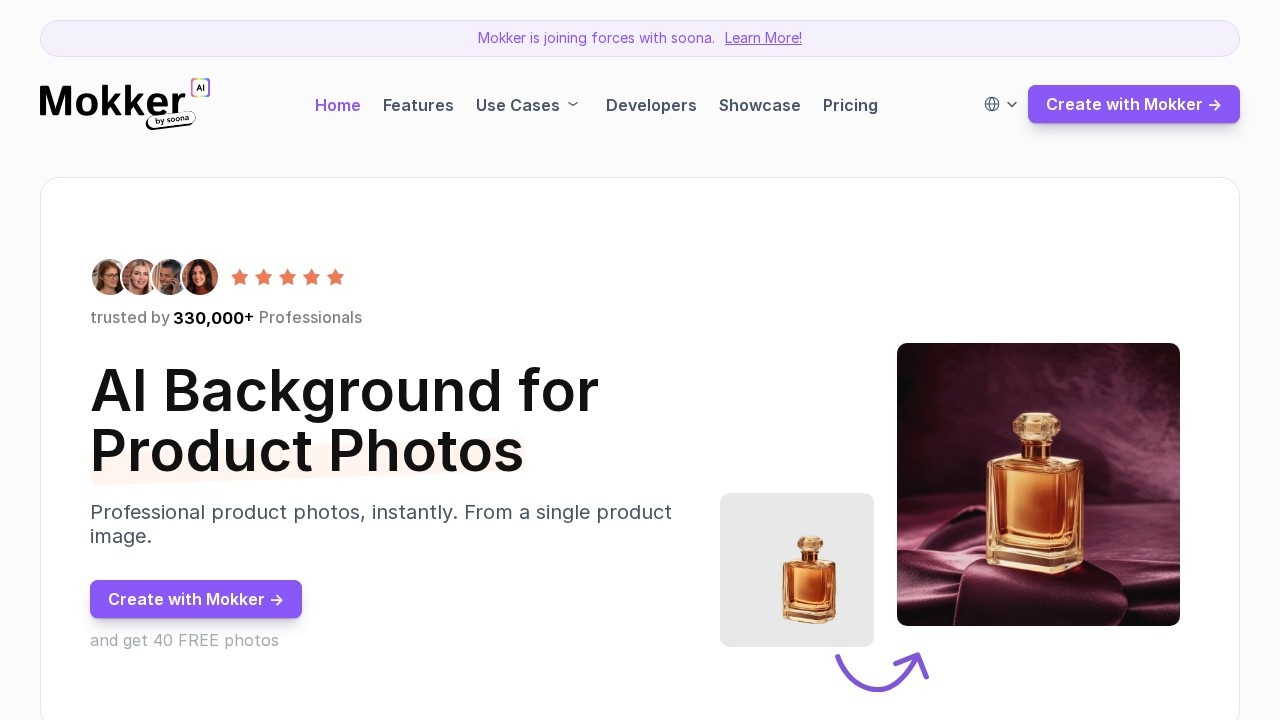
Mokker AI creates professional product photos from a single product image. You upload a photo of a product, Mokker removes the background with AI and places the product in a new scene, so online sellers can get studio-style images without a photo shoot. Mokker says more than 100,000 professionals use it. The site notes that it has joined forces with soona, a product photography and video company.
How it works
First, upload a product photo, and Mokker removes the background automatically. Second, choose from hundreds of templates covering various industries; you can always adjust them, and paid plans support custom prompts to describe your own scene. Third, receive the results within seconds, in high quality for use on stores, ads and social media.
UGC creators
Mokker also connects brands with more than 5,000 content creators for user-generated content (UGC). These include testimonial videos where creators share their experiences with your product, unboxing videos showing the moment customers open your packaging, and product-in-action videos.
Developers
A developer section offers access for integrating Mokker into your own workflow, such as generating images for a large catalogue.
Pricing
The free plan includes 20 photos once, full access to the studio and all templates. Starter is listed at $13 a month for single-person businesses, with 500 photos a month, high-quality export and custom prompts. Team is $29 per user a month for small teams, with unlimited photos and a teams account with 3 seats. Organization is $83.25 per user a month, starting from 5 seats, with a custom AI model listed as coming soon and priority support. Annual pricing saves up to 35%. Mokker currently advertises 40 free photos when you sign up.
Who it suits
It suits ecommerce sellers, small brands and marketers who need many product images quickly.
Things to consider
AI backgrounds should not misrepresent the product's size, colour or what is included, as marketplaces and consumer law require accurate listings. Some marketplaces require plain white backgrounds for main images. Check details such as labels and edges, which AI cutouts can distort.
This can save small sellers the cost of a photographer and studio for each new product, and lets marketers test different scenes for ads quickly.
Details
- Pricing
- Freemium
- Release date
- 2026-05-25
- Last checked
- 3d ago
- Indexing
- index, follow
- Category
- Image
Suggest an edit
Sign in to suggest an edit.
Alternatives
 DesignrrCollaboration hooks are there too - simple ways to pass work between teammates without emailing files back and forth or losing track of versions. It is a practical choice for...
 Kula AIKula AI brings a fresh take on ai image generation tools, pairing powerful AI with an interface that does not get in the way. It is aimed at everyday users...
 AI Photo EditorIf ai image generation tasks take up too much of your day, AI Photo Editor is built to give you time back. It handles the heavy lifting while leaving you...
 Znote AIYou are not locked into a single way of doing things. Znote AI supports your existing habits instead of forcing a new one, which makes adoption within a team much...
 Chromatic LensIf ai business tasks take up too much of your day, Chromatic Lens is built to give you time back. It handles the heavy lifting while leaving you in control....
 Pristina AI Render Realism FastYou will find a paid plan, making it easy to test the tool against your own needs first. The practical way to judge it is to use it. For a...
 Image to ImageImage to Image is a web app that combines an uploaded photo with a text prompt to create a new version of that image, keeping useful visual context such as…
 RuncomfyIt is a practical choice for ai image generation work, and the honest way to evaluate it is to give it a spin. Start at runcomfy.com for the latest information....
 Free Outline Image GeneratorFreelancers use it to keep client work moving, while in-house teams rely on it for consistent output across projects. Either way, the routine parts of ai image generation work get...
 PixlrPixlr is a free browser photo editor with AI generation, generative fill, upscaling and video and audio tools, plus cheap Plus, Premium and Ultra plans.
 Cleanup.picturesCleanup.pictures removes unwanted objects, people, text and defects from photos in the browser, free at 720px or full resolution with Pro.
 NightCafeNightCafe is a community-focused AI art generator with 50+ PRO image models, video tools, daily challenges and four PRO credit plans.