


AttractivenessTest
Free attractiveness test: face rating, PSL score and eye type measured in your browser. Your photo never leaves your device.
Sign in to rate this tool.
Overview
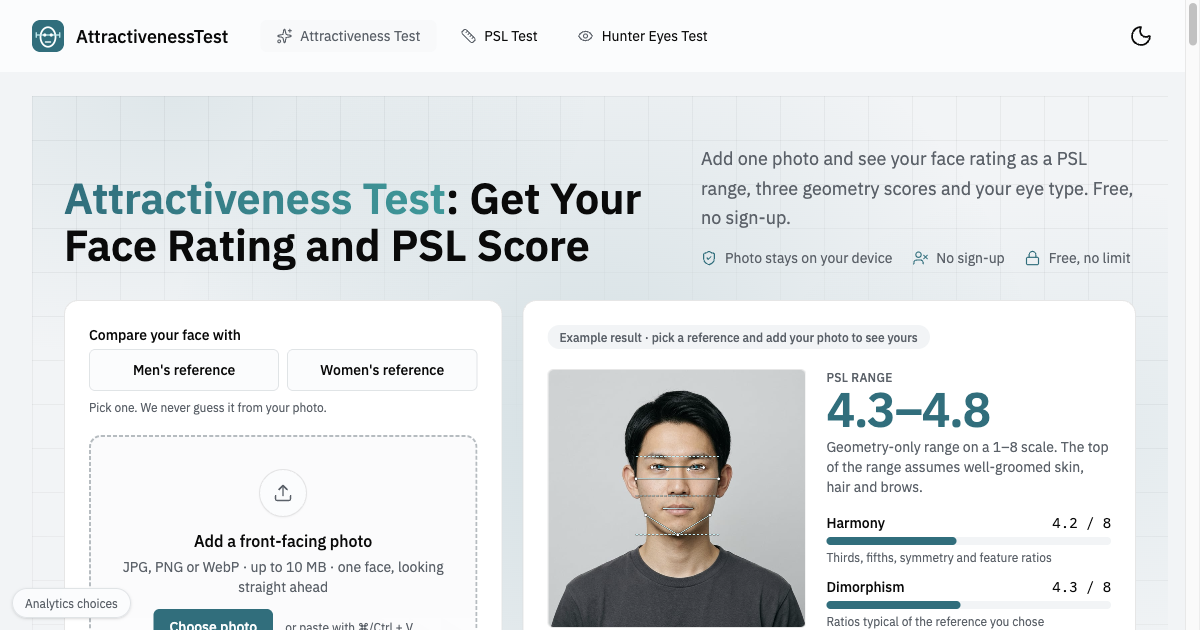
AttractivenessTest lets you see how a single front‑facing photo scores on a face rating scale, a PSL range, and a defined eye type, all inside your web browser. The service is free and does not require an account; your image never leaves the device, so no data is uploaded to a remote server. The site presents the test as a quick, one‑minute process that produces a range rather than a precise number, acknowledging that unseen skin, hair, or grooming details influence the final value.
The workflow is split into three concrete steps that you can follow in order. First, add a photo by selecting a JPG, PNG or WebP file no larger than 10 MB, or by clicking the camera icon to take a live shot. The photo must be a clear front‑view: the person should face directly toward the camera, keep lips closed, and leave the entire face in frame from forehead to chin. The instructions advise using a neutral expression, avoiding smirks or wide smiles, and ensuring even lighting; strong shadows or tilted heads trigger a rejection notice. Second, the browser loads a 6 MB face‑model, uses it to place 478 facial landmarks, and measures 22 specific proportions and angles. These include traditional geometry cues such as jaw symmetry, eye spacing, and the harmonic thirds of the face, as well as derived scores for Harmony, Dimorphism, and Angularity. Third, the results page displays a PSL range (1–8 scale), the three geometry bars with individual scores, your eye type (Hunter, neutral, or prey) calculated from canthal tilt and eye height‑to‑width, and an overlay of all measured lines on the original photo. An optional, paid AI report can add a precise score, a reading of seven facial areas, and grooming suggestions with visual previews for haircut, beard, brows, and glasses, but that feature is not part of the free version.
This tool is aimed at adults who want a quick, private snapshot of how their face measures against a calibrated reference. It works best with a single, high‑quality face photo and is not suitable for multiple faces, profile shots, or images with heavy filters, accessories, or loose hair that might obscure key landmarks.
Details
- Pricing
- Free
- Last checked
- not yet
- Indexing
- index, follow
- Category
- Lifestyle
Suggest an edit
Sign in to suggest an edit.
Pros and cons
Pros
- Entirely local processing; no data upload
- Straightforward three‑step workflow
- Detailed measurement table available
- Works with common image formats
Cons
- No published pricing or subscription options for the optional report
- Limited to one face per upload
- No live customer support information provided
Alternatives
 Veryfi ComIf ai coding tasks are part of your routine, Veryfi Com is worth testing against your own use cases. Their website, veryfi.com, has the full details. Small operations appreciate the...
 SharpniqThe flexibility shows when the same tool is used to sketch a quick idea in the morning and to polish final work in the afternoon. Sharpniq brings a fresh take...
 Slide Dish Cooking PlatingFeature, integration, and...
 Applitools EyesIt runs on a free model, so getting started is a low-risk decision. After a few sessions you will know quickly whether it fits. Applitools Eyes brings a fresh take...
 HubtypeIt is a practical choice for ai chatbots work, and the honest way to evaluate it is to give it a spin. Start at hubtype.com for the latest information. What...
 JumperPlenty of detail is tucked into the options area: adjustable quality levels, formatting choices, and automation that removes the repetitive part of ai video generation work. The design favors clarity...
 ShortlistiqYou will find a free plan, making it easy to test the tool against your own needs first. The practical way to judge it is to use it. Away from...
 Myspeakingscore ComAway from the main view, Myspeakingscore Com keeps useful depth - options for fine-tuning output, organizing past work, and revisiting favorite setups without starting from scratch. Myspeakingscore Com brings a...
 PixlrPixlr is a free browser photo editor with AI generation, generative fill, upscaling and video and audio tools, plus cheap Plus, Premium and Ultra plans.
 PicWishPicWish is a simple AI photo editor for background removal, enhancement, AI design and product images, with free, Pro, Max and pay-as-you-go options.
 Photo RestoreBefore you decide, skip the speculation and look at the source. photorestore.io shows exactly what Photo Restore does today and how to get started with it. Small operations appreciate the...
 UpscaylUpscayl is a free, open-source AI image upscaler for Linux, macOS and Windows, with a paid Upscayl Cloud service for browser upscaling, editing and generation.