


SeaArt
SeaArt combines many image and video models, one-click effect templates, AI characters and a large remix community, with Basic and SVIP access tiers.
Sign in to rate this tool.
Overview
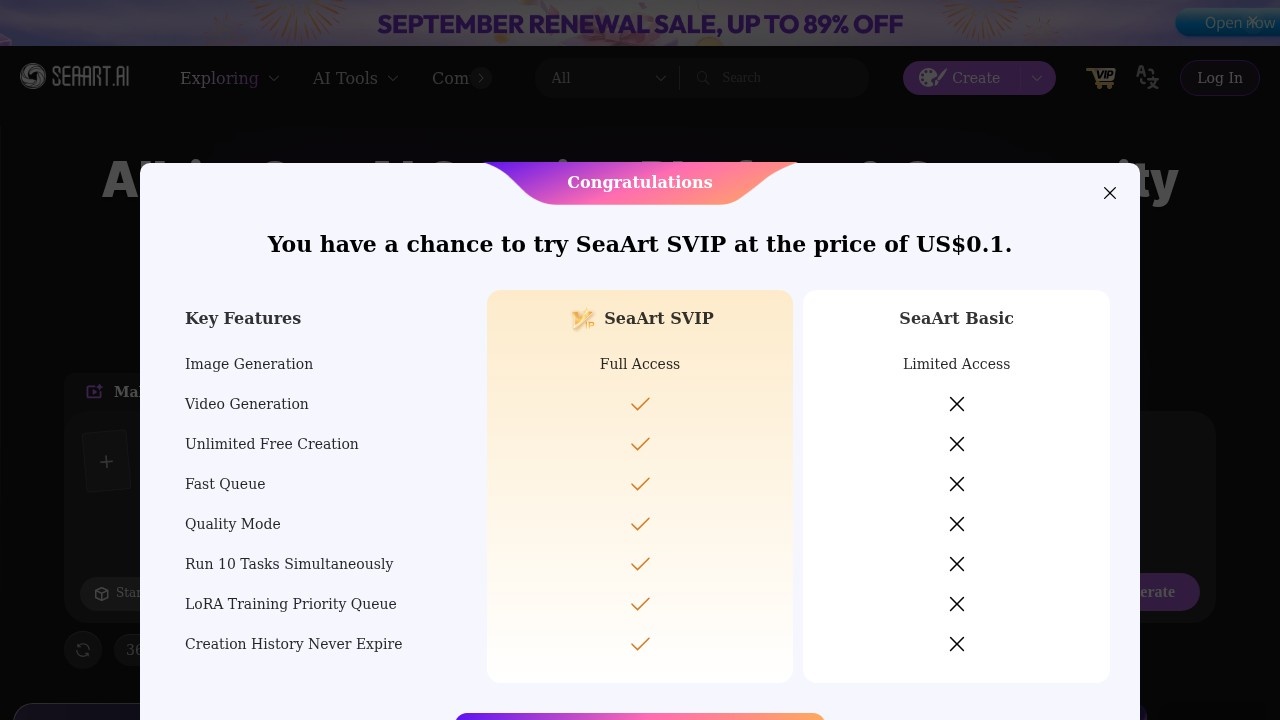
SeaArt calls itself an all-in-one AI creation platform and community. In practice it is three things in one place: a generator for images and video, a set of ready-made templates and effects, and a social network where people share, remix and gather in topic "circles" such as anime and original characters.
The models
SeaArt doesn't rely on one engine. The homepage lists a long line-up of third-party models, including Seedance 2.5, MiniMax H3, Wan 3.0, GPT Image 2 and 2.5, Seedream 5.0 Pro and Nano Banana 2.1, with Veo, Sora, Kling, Pixverse, Vidu and Flux also named. Stardream 2.5 also appears in the generator. You switch between them depending on the style and quality you want.
Templates and tools
A lot of what people do on SeaArt starts from a template rather than a blank prompt. Video effects include camera moves like a 360-degree orbit or drone rise, bullet-time and freeze-frame effects, dance templates and seasonal themes. The image side has an upscaler, filters, an eraser and a background remover, and video has lip sync, image-to-video and reference-to-video.
For deeper control there's a ComfyUI option, a way to create and share your own AI apps, model training, an Agent mode in beta and a command-line tool. AI characters you can chat with are another big part of the site, and there's a mobile app.
Plans
The official pricing page splits access into SeaArt Basic (limited access) and SeaArt SVIP (full access), with VIP offers that change over time. The plan prices didn't display clearly when we checked, so see seaart.ai/pricing for the current amounts. Checked October 2026.
Is it for you?
If you like templates, trends and remixing what others have made, and want many video models in one account, SeaArt fits well. If you want a calm, private workspace for client work, the community-first layout may get in the way.
Pros: many top image and video models; lots of one-click templates; a big, active community.
Cons: the homepage is crowded; pricing is hard to read; community content varies a lot in quality.
Alternatives
Compare Tensor.Art for community models, getimg.ai for a cleaner multi-model studio, and NightCafe for a friendlier community built around challenges.
Details
- Pricing
- Freemium
- Release date
- 2026-05-13
- Last checked
- 18h ago
- Indexing
- index, follow
- Category
- Image
Suggest an edit
Sign in to suggest an edit.
Pros and cons
Pros
- many top image and video models
- lots of one-click templates
- a big, active community
Cons
- the homepage is crowded
- pricing is hard to read
- community content varies a lot in quality
Alternatives
 getimg.aigetimg.ai is a credit-based creative studio with leading image, video, music and speech models, editing tools, AI Actions and team workspaces.
 Tensor.ArtTensor.Art is a free online image generator and model hosting site where you run community checkpoints and LoRAs or use guided tools like OC Creator.
 PicsartPicsart is an AI creative platform with 180+ image, video and audio models, trend templates, editing agents and Flow workflows, on Pro and Ultra credit plans.
 AI Ease AI Photo EditorSmall operations appreciate the low setup cost, and larger teams value the consistency. Both end up spending less time on busywork and more on the actual result. It also plays...
 ImaggaIt is a practical choice for ai image generation work, and the honest way to evaluate it is to give it a spin. Start at imagga.com for the latest information....
 KreaKrea gathers its own Krea 3 model and third-party image, video and 3D models in one suite, with realtime generation, LoRA training and pro plugins.
 Leonardo.AiLeonardo.Ai generates images and short videos with its own models plus third-party ones such as Flux, Veo and Kling, paid for with monthly tokens.
 NightCafeNightCafe is a community-focused AI art generator with 50+ PRO image models, video tools, daily challenges and four PRO credit plans.
 FotorFotor is an online photo editor and design tool with dozens of one-click AI tools for enhancing, removing, styling, generating images and video.
 Scenario ComFreelancers use it to keep client work moving, while in-house teams rely on it for consistent output across projects. Either way, the routine parts of ai image generation work get...
 Stable DiffusionStable Diffusion is Stability AI's family of open image models, free to self-host for individuals and businesses under $1M revenue, with an API and enterprise licences.
 Image PipelineThe tool is free, which keeps the barrier to entry low. You can try it before deciding whether it earns a permanent place in your workflow. Before you decide, skip...